


RouteOne GO: Truck Navigation
4.25.00 Reviews
App Specs
- Version
- 1.0.33
- Updated On
- License
- Free
- Downloads
- 10,000+
- Developer
- Route One Go
- Categories
- Maps & Navigation
- Platform
- Android
Screenshots
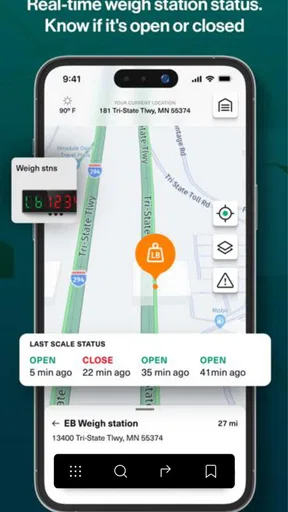
 Analysis by AppCompare
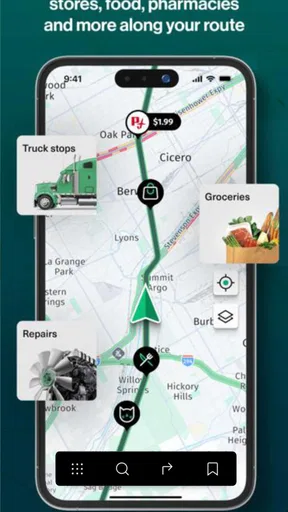
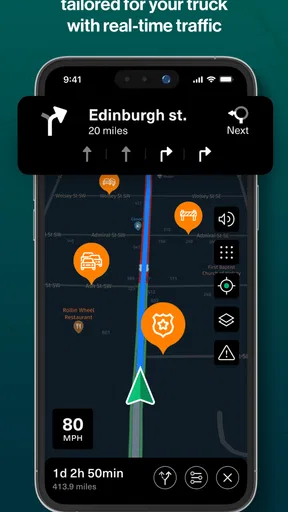
I spend a lot of time testing navigation apps, and truck routing is where a normal car-focused map can become genuinely inconvenient. A route that looks sensible for a small vehicle may be unsuitable for a heavy truck, waste fuel through unnecessary detours, or leave the driver searching for a practical place to stop. RouteOne GO: Truck Navigation takes a more focused approach. It is a free Maps & Navigation app from Route One Go, built around truck-oriented routes, fuel-cost awareness, and useful stops along the journey.
After using it as a dedicated planning tool rather than treating it like a general-purpose map, I found its main appeal quite clear: it encourages drivers to think about the whole trip, not just the next turn. That distinction matters when a route has to work for a large vehicle, a schedule, and a fuel budget at the same time. It is available to Everyone, supports devices running Android 8.0 or later, and the current version is 1.0.33.
It is still a relatively young app, released on November 20, 2024, with over ten thousand installs. Its average rating sits at 4.2 from 46 ratings, while five written reviews give the app a modest but useful amount of public feedback. I would not treat those figures as proof that it will suit every fleet, but they do place it in an interesting position: established enough to try, yet focused enough that drivers should personally test it against their regular routes.
Building a dependable truck-navigation routine
I approach truck navigation as a routine, not a single tap: I check the destination and route before setting off, then leave changes for a safe stop rather than sorting them out while moving. That habit makes it easier to spot a plan that deserves a second look and keeps the driver’s attention where it belongs. Next, I’d focus on the simple setup checks that help make a route review useful.
Start with the route, then check whether it fits the working day
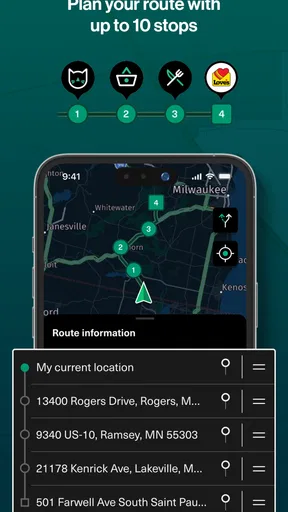
My preferred way to use RouteOne GO is not to open it only after the vehicle is already moving. I begin before departure, select the journey, and look at the route as a plan for the entire shift. The first question is not simply whether the arrival point is correct. I want to know whether the suggested path makes sense for a truck, whether the fuel implications are acceptable, and whether the available stops match the timing of the trip.
This is a small change in habit, but it makes the app more useful. A driver who checks only turn-by-turn directions may miss the larger decision. A driver who reviews the route before leaving can compare the planned distance and stops with the real needs of the vehicle. That is where the app’s truck-focused design has more value than a standard map used without any preparation.
For a local delivery, I would use it to organize the order of the day and identify a sensible stopping point before the final destination. For a longer run, I would review the route at the start, then revisit it during a planned break rather than constantly changing directions while driving. This keeps the navigation task separate from driving decisions and reduces the temptation to make rushed changes.
Worth Reading Before You Choose

Flipboard Shows What News Apps Must Do Beyond the Feed

Switching to Android Auto Means Rethinking Your Driving Routine

Google Calendar Makes a Crowded Week Easier to Manage

Ludo King Makes the Most of the Minutes Between Plans

Baby Panda World Brings Quick Play to Modern Phones, but Its Game Library Feels Busy

ESPN’s Live Game View Makes Following Close Games Easier
A realistic morning with a loaded vehicle
Imagine leaving early with a loaded truck for a delivery several hours away. A general navigation app may offer the quickest-looking route for an ordinary car, but that route may not reflect the practical needs of a larger vehicle. With RouteOne GO, I would first inspect the proposed truck route, then consider where fuel and rest fit into the journey. If the first suggested stop is too early or too late for the shift, I would use the route view as a planning reference instead of blindly accepting it.
The useful habit here is to treat fuel costs and key stops as part of route selection, not as information to check after a problem appears. A slightly different route may be easier to manage if it produces a better stopping pattern. Conversely, a route that looks attractive on fuel may be less convenient if it creates an awkward break schedule. The app helps bring those trade-offs into the same conversation.
I would also take a screenshot or note of the planned stop sequence before leaving if the route is important. That is not a special feature claim; it is simply a practical backup habit. Navigation software can be affected by signal quality, changing road conditions, or a driver needing to pause. Having the plan mentally clear makes the app a support tool rather than the only source of confidence.
Why a truck-specific mindset matters
The strongest reason to try this app is its narrower purpose. RouteOne GO is not presented as an all-purpose travel companion for every kind of transport. Its identity is built around truck navigation, and that focus changes how I judge it. I care less about decorative extras and more about whether the route, fuel view, and stop planning help me avoid decisions that are easy in a car but costly in a truck.
That focus will be most valuable to independent drivers, small operators, and anyone who regularly drives a larger vehicle but does not want to build a route manually every time. It may also help a new driver develop a repeatable planning routine. The app does not remove professional judgement, though. Drivers still need to follow road signs, respect restrictions, and use their own knowledge of the vehicle and delivery location.
Settings and preparation worth checking
Before relying on any navigation app for work, I check the available route and vehicle-related settings carefully. In this case, I would pay particular attention to whether the app reflects the kind of truck being driven and whether the chosen route behaves sensibly for the vehicle’s normal work. I would also confirm the destination precisely. A warehouse entrance, customer gate, or industrial estate can be more important than the broad street address.
RouteOne GO’s store summary emphasizes optimized routes, fuel costs, and key stops, so those are the areas I would verify first in a real workflow. I would not assume that a route labeled efficient is automatically the cheapest or easiest in every situation. Fuel use depends on load, traffic, weather, driving style, and the vehicle itself. The app can inform the decision, but it cannot know every operational detail unless the driver supplies or checks it.
One useful approach is to compare the suggested route with the route you already know. If the app recommends a familiar road, check whether the result feels realistic at the times you normally drive. If it chooses an unfamiliar alternative, inspect the full path before departure rather than judging it from a single distance figure. This is especially important for industrial areas, where the final approach may be more complicated than the main highway section.
I also recommend checking the app after installation and before a demanding trip, not five minutes before leaving. The minimum operating system is Android 8.0, so many older Android phones can run it, but compatibility alone does not guarantee a comfortable experience on every device. Screen size, battery condition, mounting position, and the phone’s general responsiveness matter just as much for a working driver.
Fuel information is useful only when interpreted carefully
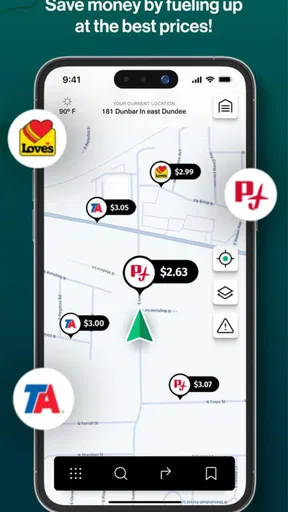
Fuel-cost planning is one of the more practical ideas in the app, but it should be treated as an estimate for comparison rather than a promise. I would use it to compare two plausible routes, identify where a longer detour may stop making financial sense, and decide whether a planned fuel stop fits the journey. I would not use a displayed cost as an exact expense figure for accounting.
A good repeatable habit is to review the fuel picture before starting and again after a major route change. If traffic or a delivery delay changes the plan, the original comparison may no longer be the right one. The driver can then decide whether staying on the route, taking a different road, or postponing a stop is more sensible. This is a stronger use of the feature than simply glancing at the lowest number.
Fuel planning also exposes a useful trade-off. The shortest route is not always the best route for a truck, and the route with the lowest estimated fuel cost may not fit the driver’s break schedule. I like that RouteOne GO places these considerations near navigation, but I would still make the final choice using real-world knowledge of the vehicle and the day’s work.
Faster patterns for repeat journeys
Drivers who repeat the same corridors can get more value by creating a consistent pre-drive checklist around the app. I would confirm the destination, review the route, check the proposed stops, consider fuel, and only then begin navigation. Doing those steps in the same order prevents the common mistake of treating the first route shown as the final plan.
For a regular delivery, I would also record which parts of the route deserve extra attention: the final approach, a difficult interchange, a preferred fuel area, or a stop that works better for the vehicle. The app remains the navigation tool, while the driver gradually builds a personal operating routine around it. That combination is more dependable than expecting any app to understand every local detail on its own.
Another efficient pattern is to separate route planning from live navigation. Before departure, use the larger planning view to evaluate the trip. During the drive, keep attention on the road and follow the selected route unless conditions require a change. At a break, reassess the remaining journey. This reduces screen interaction while moving and makes the app easier to use responsibly.
For owner-drivers, that routine can also make fuel decisions easier to explain later. Rather than remembering why a detour was taken, the driver can compare the original plan with the revised one and connect the change to a practical reason, such as a better stop or a more suitable route. The app does not need to become a full fleet-management system to be useful in this narrower role.
Where it compares well with ordinary map apps
Standard map apps are usually better when I need broad place search, walking directions, public transport information, or a familiar interface used by everyone in the household. They are also convenient when I am driving a normal car and have no special route-planning concerns. For those jobs, a truck-focused tool may feel unnecessarily narrow.
RouteOne GO makes more sense when the vehicle and the journey shape the decision. Its emphasis on truck routing, fuel costs, and key stops gives it a more relevant starting point for professional driving. Instead of adapting a car navigation app with personal workarounds, I can begin with the concerns that actually affect the trip.
The trade-off is breadth. I would not replace every map application with it. If I needed extensive place information, broad travel modes, or the most familiar search experience, I would keep a general map app available. For truck work, however, a specialized planner can be more useful even when it is less universal.
Limits that experienced users should understand
The first limitation is that specialization does not equal perfect local knowledge. A truck route can be technically plausible while still being awkward for a particular delivery site, vehicle combination, or operating schedule. I would always check the final approach and follow posted restrictions rather than assuming the app’s route overrides what is on the road.
The second limitation is that fuel-cost guidance cannot replace the driver’s own figures. A heavily loaded vehicle, changing fuel prices, weather, traffic, and idling can all affect the real result. I see the feature as a comparison aid. It is valuable when choosing between options, but weaker when treated as a precise prediction.
The third is that a small app with a relatively limited review history deserves a measured trial before becoming essential to daily operations. Its 4.2 average is encouraging, but I would test it on familiar routes first. That gives the driver a safe way to learn how its suggested routes and stops fit real work before using it on an unfamiliar or time-sensitive run.
There is also a financial detail worth noticing. The app is free to install, while in-app purchases are listed at $12.99 per item. That does not automatically make it poor value, but it does mean I would inspect any purchase screen carefully and decide whether the available functions justify the cost for my kind of driving. A casual user may never need to spend anything, while a frequent truck driver may judge paid items differently.
I would skip this app if I mainly need a general navigation service for family travel, walking, or mixed transport. I would also hesitate to make it the only navigation tool for a fleet without first testing it on the company’s actual routes and vehicles. Drivers who need detailed dispatch, team coordination, or broader logistics functions may be better served by a larger professional platform. RouteOne GO appears more appropriate as a focused navigation and planning companion.
My verdict after using it as a working tool
I like RouteOne GO because it encourages a better question than “Which road gets me there?” It asks the driver to consider whether the route suits a truck, what it may mean for fuel, and where the journey can be managed sensibly. That makes it more relevant than a standard car map for the right audience.
Its best results come from disciplined use: plan before moving, inspect the full route, check the stops, interpret fuel figures as guidance, and reassess at a safe break when the day changes. Those habits turn a simple navigation app into a repeatable workflow. They also protect against the biggest mistake with any route planner, which is following it mechanically without applying local knowledge.
I would recommend giving it a trial if you are an Android truck driver looking for a focused alternative to ordinary maps. The free entry point makes testing straightforward, and the Everyone rating keeps it broadly accessible. Just use the app on familiar work first, verify the route against your vehicle and destination, and decide for yourself whether any optional purchase is worthwhile.
My final view is positive but practical: RouteOne GO is most convincing as a truck-oriented planning companion, not as a replacement for professional judgement or every other map app. If fuel awareness and planned stops are central to your day, it offers a useful structure. If you only need basic directions or a broad travel app, its specialized approach may not add enough to justify changing your routine.
Pros
- Truck-specific routing helps avoid roads unsuitable for large vehicles.
- Clear turn-by-turn guidance is useful during long commercial trips.
- Route planning can account for vehicle dimensions and weight limits.
- The interface is designed for quick access while driving.
- Helpful for drivers who need navigation tailored to freight routes.
Cons
- Coverage and route accuracy may vary between regions.
- Some advanced navigation features may require a paid subscription.
- Traffic information may not always reflect current road conditions.
- Entering detailed truck dimensions can take time before starting a trip.
- The app may use significant battery and mobile data on long journeys.
FAQs for RouteOne GO: Truck Navigation
What is RouteOne GO: Truck Navigation used for?
RouteOne GO: Truck Navigation is designed to help professional truck drivers plan and follow routes that are more suitable for commercial vehicles. Instead of treating a truck like a standard car, navigation can take factors such as vehicle dimensions, weight, road restrictions, and unsuitable streets into account. It is intended to support safer, more practical journeys for drivers operating trucks, vans, and other larger vehicles.
Does RouteOne GO consider truck size, weight, and road restrictions?
The main advantage of a truck-focused navigation app is its ability to use vehicle-specific information when calculating routes. Depending on the available settings and service coverage, RouteOne GO may account for details such as height, width, length, weight, axle configuration, low bridges, restricted roads, and commercial-vehicle limitations. Drivers should enter their vehicle data accurately and always verify signs and local regulations while driving.
Can RouteOne GO: Truck Navigation work without an internet connection?
Offline availability depends on the version of the app, the selected map coverage, and whether maps can be downloaded for use without mobile data. Before starting a trip, check the app’s map-download or offline-navigation options and save the required regions while connected to Wi-Fi. Even with offline maps, live traffic, road closures, weather information, and other online features may be unavailable or less accurate.
Is RouteOne GO suitable for professional drivers and fleet operations?
RouteOne GO can be useful for long-haul drivers, delivery operators, and small transport businesses that need navigation adapted to commercial vehicles. Its value depends on the quality of regional map data, route restrictions, traffic information, and the accuracy of the vehicle profile. Fleet managers and professional drivers should test it on familiar routes first, compare results with company procedures, and avoid relying on any navigation app as the only source of guidance.
Is RouteOne GO: Truck Navigation free to download and use?
The app may be available to download without an upfront charge, but some navigation functions can depend on subscriptions, paid map packages, in-app purchases, or regional availability. Pricing and included features may change over time, so review the current Google Play or App Store listing before installing. Also check whether premium features, offline maps, traffic data, or fleet-related tools require a separate payment.


